AI Explode Effect

Why Use Vimi for AI Explode Effect
Save hours of manual work. You do not need desktop software. Vimi runs entirely on your phone. The app has thousands of templates updated daily. You can create explode videos from either your own photos or just a text idea. Each effect is optimized for TikTok, Instagram, or YouTube Shorts. No watermarks on your output.
Creative Applications for AI Explode Effect
Use the explode effect for action movie style intros. Describe a city block then blow up a specific building. Make a plane burst into particles. Turn product photos into dramatic reveals. Music artists can create lyric videos where words explode. Gamers can turn highlights into burst transitions. Small businesses can make eye catching ads. The text input feature lets you create scenes you never photographed.
Creative Applications for AI Explode Effect
Use the explode effect for action movie style intros. Describe a city block then blow up a specific building. Make a plane burst into particles. Turn product photos into dramatic reveals. Music artists can create lyric videos where words explode. Gamers can turn highlights into burst transitions. Small businesses can make eye catching ads. The text input feature lets you create scenes you never photographed.
Key Features of Vimi AI Explode Effect
Explore the core features that let you generate explosion photos from text descriptions in seconds.
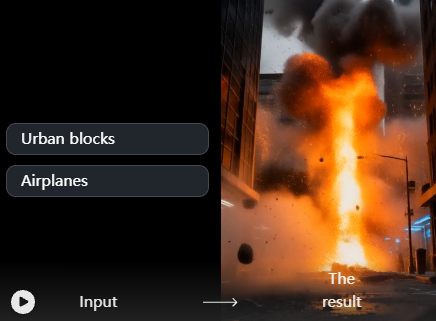
Dual Input Methods
Type a description. Describe a favorite scene like a city block. Add main objects such as an airplane or vehicles. Vimi generates the explode effect directly from your words.
Dual Input Methods
Type a description. Describe a favorite scene like a city block. Add main objects such as an airplane or vehicles. Vimi generates the explode effect directly from your words.
One Tap Generation
Choose an explode style template, then tap Generate. Vimi handles all complex processing. You get a ready to use video in 15 to 20 seconds without any manual editing or prompt engineering.
One Tap Generation
Choose an explode style template, then tap Generate. Vimi handles all complex processing. You get a ready to use video in 15 to 20 seconds without any manual editing or prompt engineering.
Real world application scenarios
Enter the objects you want to appear in the scene, such as buildings, people, or vehicles. Vimi will help you recreate the scene as realistically as possible.
Real world application scenarios
Enter the objects you want to appear in the scene, such as buildings, people, or vehicles. Vimi will help you recreate the scene as realistically as possible.
Frequently Asked Questions
Find clear answers to common questions and get the guidance you need to make the most of our platform, faster and easier.
More Topics You May Like
Explore more topics you may like and discover fresh ideas tailored to your interests.
AI Horror Generator
AI Happy Birthday Generator
AI Hair Color Changer
AI Horror Generator
AI Happy Birthday Generator
AI Hair Color Changer
Download Vimi And Explode Your Creativity
Get the app now. Make your first explode video from a photo or a text idea.

Download Vimi And Explode Your Creativity
Get the app now. Make your first explode video from a photo or a text idea.