If you have tried to generate a tattoo photo with AI and received a flat design that looks pasted onto skin, the missing ingredient is usually the prompt. These Tattoo AI Photo Prompts are written to help you create realistic tattoo images with believable placement, skin texture, lighting, and camera detail. Paste any prompt into Vimi, choose a photography style template, and generate an original tattoo image in seconds. Change one or two details and you have an entirely new result.
How to Use These Tattoo AI Photo Prompts
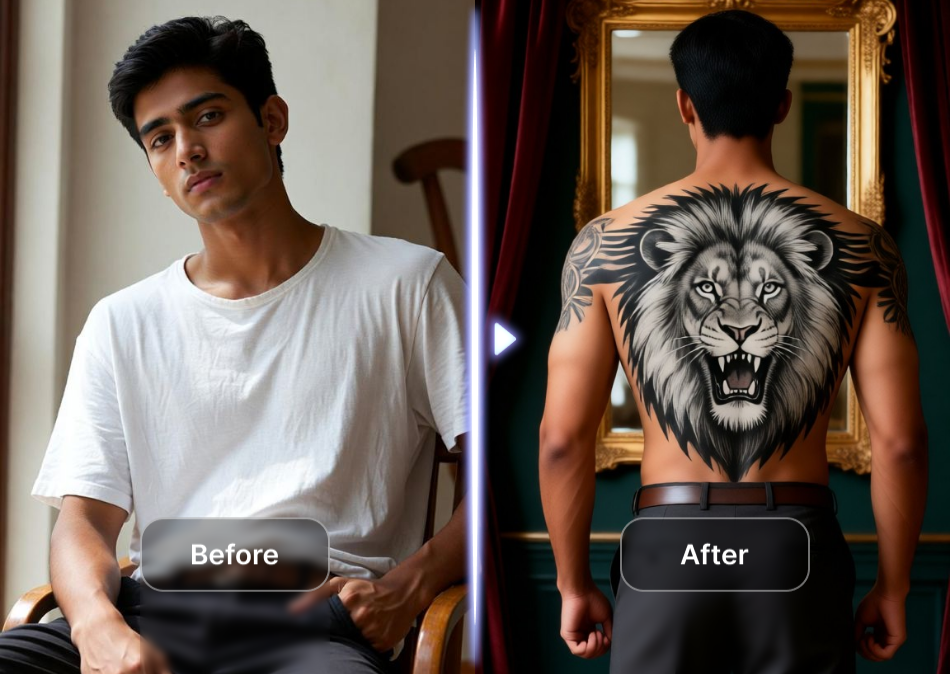
Open Vimi on your phone and select the text to image mode. Paste the prompt exactly as written, or edit it before generating. Choose a realistic photo style or a fine art filter to keep skin looking natural. Generate a few versions, keep the best one, and adjust the subject, placement, or lighting in your prompt for more variety.
Each prompt below follows the same pattern: subject, tattoo style, body placement, lighting, camera angle, and background. You can swap any of those pieces. For example, change a woman to a man, change blackwork to watercolor, or change a studio background to a beach background.
30 Tattoo AI Photo Prompts to Try
Realistic Tattoo Portrait Prompts
- Close up portrait of a young woman with a detailed black ink floral sleeve tattoo, soft studio lighting, visible skin texture, neutral beige background, photorealistic, 85mm lens
- Side profile of a man with a realistic lion tattoo on his forearm, fine shading, high detail, warm outdoor light, shallow depth of field, professional tattoo photography
- Macro shot of a tattoo artist's hand with blackwork geometry and dotwork tattoos, raw skin texture, dramatic window light, high resolution photography
- Portrait of a middle aged man with a neotraditional compass and map tattoo on his chest, golden hour light, authentic skin pores, sharp focus on ink
- Full color koi fish tattoo on a woman's shoulder, Japanese traditional style, red and teal ink, studio lighting, photorealistic, clear tattoo details
Black and Grey Tattoo Prompts
- Black and grey sleeve tattoo with clock, rose, and dagger, wrapped around a muscular arm, moody lighting, high contrast, photographic realism
- Minimalist blackwork snake tattoo on a woman's ribcage, fine line style, soft natural light, visible skin texture, editorial photography
- Dotwork mandala tattoo on the back of a man, black ink only, symmetrical design, studio lighting, high resolution photo
- Portrait of a woman showing a black script tattoo on her collarbone, delicate lettering, soft focus background, natural makeup, realistic photography
- Black and grey wolf tattoo on a man's thigh, hyperrealism, detailed fur and shadows, side light, sharp macro photo
Fine Line and Minimalist Tattoo Prompts
- Delicate fine line tattoo of lavender sprigs on a woman's ankle, minimalist style, bright natural light, clean skin, closeup photo
- Tiny constellation line tattoo behind a person's ear, thin black lines, simple stars, soft daylight, macro photography
- Single line face drawing tattoo on a woman's forearm, continuous line art, minimal ink, neutral background, editorial style photo
- Fine line butterfly tattoo on a wrist, ultra thin black lines, light skin tone, macro shot, soft shadows
- Minimalist mountain landscape tattoo on a man's calf, fine contour lines, no shading, outdoor light, crisp detail
Color and Watercolor Tattoo Prompts
- Watercolor style phoenix tattoo on a woman's back, bright blues, purples, and orange splashes, paint bleed effect, studio lighting, photorealistic
- Small hummingbird tattoo with watercolor splashes on a shoulder, colorful ink, soft edges, natural skin tones, closeup photo
- Vibrant neotraditional rose tattoo on a forearm, rich reds and greens, bold outlines, glossy skin texture, high resolution
- Geometric watercolor elephant tattoo on a man's chest, pastel pink and blue washes, precise black lines, soft light
- Colorful abstract watercolor tattoo on a calf, splashes of yellow, green, and magenta, no harsh outlines, high detail photo
Editorial and Fashion Tattoo Photo Prompts
- Fashion editorial photo of a model with a full color Japanese sleeve tattoo, dark background, dramatic rim light, haute couture style, high contrast
- Beauty portrait of a woman with bold neck and chest tattoos, soft glamour lighting, smooth skin, bright clean studio, editorial photography
- Male fitness model with blackwork torso tattoos, gym setting, moody blue light, muscular definition, professional photo
- Alternative model with face and hand tattoos, neon light reflections, urban night background, cinematic color grading, editorial style
- Elegant portrait of an older woman with a small rose tattoo on her hand, soft window light, linen clothing, authentic skin texture, fine art photography
Creative and Artistic Tattoo Concept Prompts
- Surreal double exposure style photo of a woman with a forest and bird tattoo blending into a real forest background, black and white
- Macro photo of a tattoo needle on skin with ink particles, extreme closeup, dramatic lighting, high detail
- A person with a glowing galaxy tattoo on their arm, dark background, neon ultraviolet light, photorealistic
- Black and white studio portrait of a dancer with a large tribal tattoo across the back, dynamic pose, soft shadows, high contrast
- Close up of a hand with sacred geometry tattoos holding a raw crystal, moody light, textured skin, fine art photo
How to Adapt These Prompts for Better Results
The strongest tattoo AI photo prompts are specific about placement and skin. If your result looks like a temporary sticker, add descriptive phrases such as healed tattoo, ink settled into skin, follows the curve of the shoulder, or slightly faded black ink. These details encourage a more natural texture and closer integration with the body.
You can also change the environment without losing the tattoo. Keep the tattoo description intact and swap in a new setting: a coffee shop window, a beach at sunset, a rooftop with city lights, or a dark studio with a single key light. For a more editorial look, add a camera note like 50mm lens, shallow depth of field, or film grain.
Common Issues and How to Fix Them
- Tattoo looks pasted on skin: Add skin texture, healed ink, soft natural blending, and mention the specific body contour such as wraps around the forearm.
- Too many fingers or hands look wrong: Reframe the prompt to one person, centered composition, hands resting on a table, or crop to the tattoo area only.
- Style is too flat or cartoonish: Remove words like illustration or vector. Add photorealistic, professional tattoo photography, or high detail skin.
- Faces look distorted in closeups: Move the camera away from the face and focus on the tattoo. Use phrases like side profile, back view, or hand close up.
- Tattoo design is inconsistent: Repeat the main design twice in different ways, for example blackwork snake tattoo with geometric scales and symmetrical dotwork pattern.
How to Generate These Prompts in Vimi
Vimi is designed to make AI photo generation fast, so you do not need complex prompt engineering. Open the app, choose text to image, paste one of the prompts above, and select a photo style. The app offers a large library of filters that can push the same prompt toward cinematic, realistic, or artistic results. Generate several variations and keep the one that fits your reference.
For a pure tattoo design without a person, remove the subject and camera language. For example, use blackwork snake tattoo design, black ink on white background, symmetrical, high contrast, print quality. For a portrait with tattoo, keep the person and full lighting details.